

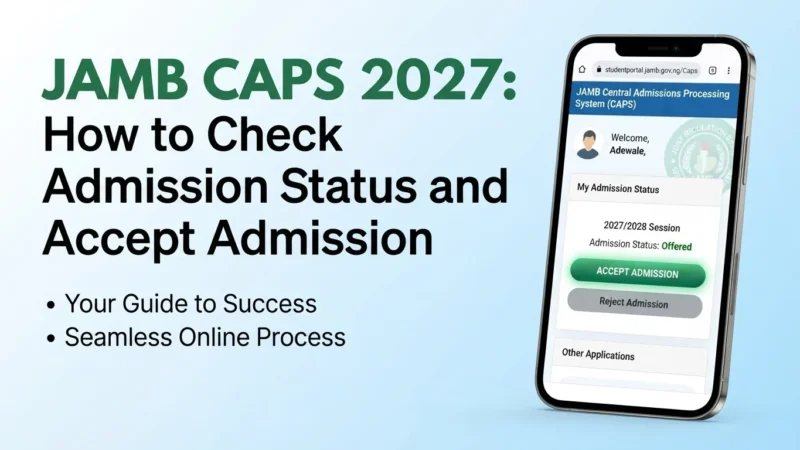
JAMB CAPS is the system candidates use to follow the admission process after UTME. If you are waiting for admission in 2027, you should learn how to check your status, review an admission offer and respond to it through the official JAMB process.
The 2027 admission cycle is not yet at the stage where candidates can check a final 2027 admission offer. JAMB’s current IBASS information lists the 2027 UTME as upcoming. Admission information should therefore be checked against JAMB’s official announcements as the cycle progresses.
What is JAMB CAPS?
CAPS means Central Admissions Processing System. It is JAMB’s platform for processing and monitoring admissions. Candidates can use it to check whether an admission offer has been made and, where applicable, accept or reject the offer.
How to check JAMB admission status on CAPS
- Go to the official JAMB CAPS portal or start from the JAMB website.
- Log in with the details requested by JAMB.
- Open the admission status section.
- Check whether an institution has offered you admission.
- Read the programme and institution details carefully before making a decision.
Use only the official JAMB portal for your admission status. Do not give your login details to an agent who claims that they can access CAPS for you.
How to accept admission on JAMB CAPS
If CAPS shows an admission offer and the accept or reject options are available, review the details carefully before choosing an option. Accept an offer only when you understand the institution and programme shown on your profile.
After accepting an offer, continue following the instructions from JAMB and the institution. An admission offer can have additional steps, deadlines or documentation requirements.
What if CAPS shows “Not Admitted”?
Not Admitted does not necessarily mean that the admission exercise is finished. Institutions release admissions at different stages, and JAMB may continue processing offers during the admission period.
Keep checking the official JAMB channel and your institution’s admission portal. Do not pay someone who promises to change a CAPS status through a private connection.
What if CAPS shows “Admission in Progress”?
An admission-in-progress message can indicate that your admission is still being processed. The exact wording and status information can change as JAMB updates the system.
Continue monitoring CAPS and the institution’s official admission information rather than assuming that the status is a final admission decision.
Can you reject an admission offer?
CAPS provides candidates with an option to respond to admission offers when the relevant controls are available. Think carefully before rejecting an offer because your decision can affect the admission you have been offered.
JAMB CAPS and school admission portals
JAMB CAPS and an institution’s admission portal are related but are not the same system. A university may publish screening or admission information on its own website while JAMB processes admission through CAPS.
For that reason, candidates should monitor both sources. If the information appears inconsistent, contact the institution or JAMB through an official channel rather than relying on an agent’s explanation.
What you should check before accepting admission
- Institution name
- Course or programme offered
- Your UTME and eligibility requirements
- O’level requirements
- Any deadline given by JAMB or the institution
- Any additional registration or clearance instructions
What if you changed your course or institution?
If you changed your institution or programme during the admission process, make sure your current choices are reflected correctly in the relevant JAMB records. Do not assume that an old choice will automatically update everywhere.
Keep copies of important registration and change-of-course or institution documents. If something appears incorrect, use JAMB’s official correction or support process.
Beware of fake JAMB CAPS agents
Admission season attracts people who claim they can influence CAPS, upgrade scores or guarantee admission. Be careful with anyone asking for money in exchange for a guaranteed admission outcome.
Never send your password, PIN or other security information to an unknown person. Use the official JAMB portal and official institutional channels.
JAMB CAPS 2027 checklist
- Keep your JAMB login details secure.
- Check CAPS regularly when the 2027 admission cycle begins.
- Monitor your institution’s official admission portal.
- Read the exact course and institution shown before responding to an offer.
- Accept or reject an offer only after checking the details carefully.
- Keep evidence of important admission transactions.
- Ignore anyone promising guaranteed admission through a private connection.
Frequently asked questions
When can I check JAMB CAPS for 2027?
You can use CAPS when the relevant admission cycle is active and your admission information is being processed. The 2027 admission cycle will follow the examination and admission timeline announced by JAMB.
Does “Not Admitted” mean I have failed?
Not necessarily. Admission can be released in stages. Continue checking the official channels during the active admission period.
Can I accept admission on my phone?
JAMB provides online access to CAPS, but the exact interface and available options can change. Use the current official portal and follow the instructions shown there.
Does JAMB CAPS admission guarantee school clearance?
No. You may still have to complete the institution’s registration, screening, clearance and other requirements after receiving an admission offer.
Official JAMB resources
Related JAMB guides
Read our complete JAMB 2027 guide for registration, UTME, results and admission information.
You can also read our JAMB result 2027 guide and our JAMB cut-off mark 2027 guide.
 JAMB & Exams
How to Build a 12-Week Study Plan for JAMB UTME 2027
JAMB & Exams
How to Build a 12-Week Study Plan for JAMB UTME 2027
 JAMB & Exams
JAMB Syllabus 2027: How to Check the Official UTME Syllabus
JAMB & Exams
JAMB Syllabus 2027: How to Check the Official UTME Syllabus
 JAMB & Exams
JAMB Data Correction 2027: How to Fix Your Name, Date of Birth and Other Details
JAMB & Exams
JAMB Data Correction 2027: How to Fix Your Name, Date of Birth and Other Details
 JAMB & Exams
JAMB Matriculation List 2027: How to Check Your Name
JAMB & Exams
JAMB Matriculation List 2027: How to Check Your Name
 JAMB & Exams
JAMB 2027 Registration Checklist: NIN, Profile Code, Email and CBT Centre
JAMB & Exams
JAMB 2027 Registration Checklist: NIN, Profile Code, Email and CBT Centre
 JAMB & Exams
JAMB Subject Combination 2027: Check the Right Subjects for Your Course
JAMB & Exams
JAMB Subject Combination 2027: Check the Right Subjects for Your Course
 JAMB & Exams
JAMB 2027 Subject Combination: How to Confirm the Right UTME Subjects
JAMB & Exams
JAMB 2027 Subject Combination: How to Confirm the Right UTME Subjects
 JAMB & Exams
JAMB Result 2027: How to Check Your UTME Result
JAMB & Exams
JAMB Result 2027: How to Check Your UTME Result
 JAMB & Exams
JAMB Change of Course or Institution 2027: How to Apply
JAMB & Exams
JAMB Change of Course or Institution 2027: How to Apply
 JAMB & Exams
JAMB Cut-Off Mark 2027: Minimum Score and What It Means
JAMB & Exams
JAMB Cut-Off Mark 2027: Minimum Score and What It Means
